










SnapApp for Mac
- Free
- 4.5
- V0.3.10
Free Download for Mac
View an ad to download for free

- SnapApp
Snipping tool for Mac: snip, mark up, blur and copy
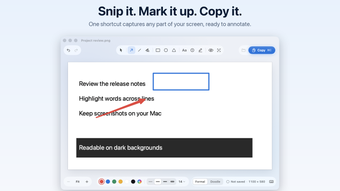
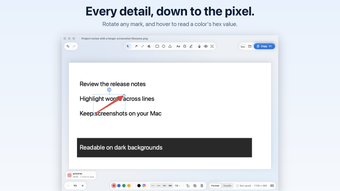
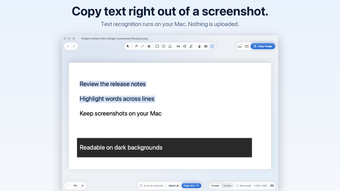
SnapApp is a snipping tool for Mac. Press Shift-Command-2, drag over any part of the screen, and the capture opens in a clean editor, ready to mark up. Add arrows, lines, rectangles, circles, text, numbered steps and highlights, in a crisp formal style or a hand-drawn doodle style. Blur or pixelate names, email addresses and passwords before you share. Pick any color on screen and copy its hex value. Rotate any mark, undo every step and zoom in to the pixel. Text recognition runs on your Mac, so you can select the words in a screenshot and copy them as text. Nothing is uploaded. When you are done, press Command-C to copy the finished image, ready to paste into a chat, an email or a document, or save it as a PNG. SnapApp lives in the menu bar, can start at login, and keeps your screenshots on your Mac. It runs natively on Apple silicon and Intel Macs with macOS 14 Sonoma or later.
Loading…
App specs
Developer
- SnapApp
License
Free
Version
0.3.10
Latest update
Platform
Mac
OS
macOS 10.15
Language
English
Size
3.72 MB
SnapApp for Mac
- Free
- 4.5
- V0.3.10
Free Download for Mac
View an ad to download for free
User reviews about SnapApp
Have you tried SnapApp? Be the first to leave your opinion!
Add reviewTop downloads Screen Capture for Mac
Top downloads Screen Capture for Mac
Top downloads Screen Capture for Mac
Related topics about SnapApp
Latest articles

Quentin Tarantino westerns hit Prime Video: Django and The Hateful Eight

Google Flights updates holiday guide: Thanksgiving deals fade, Christmas fares hit a sweet spot

James Webb may have spotted the earliest giant black holes yet

The Dark Knight Trilogy is leaving Netflix UK: watch it by November 7

Sucker Punch in the U.S.: it’s streaming, just not on Netflix
Laws concerning the use of this software vary from country to country. We do not encourage or condone the use of this program if it is in violation of these laws. Softonic may receive a referral fee if you click or buy any of the products featured here.